ConverterLite – Audio and Video for DVD, iPhone, iPad, Android Smartphone, PS3, PSP and more!

ConverterLite is a free audio and video batch conversion program.

Main menu

Skip to content
  • EULA
  • Privacy

Post navigation

← Convert MPEG to 3GP
Version 1.6.2 →

Version 1.6.1

Posted on January 24, 2013 by dylan

ConverterLite version 1.6.1 was published on Thursday 15th November.

Download version 1.6.1 here: http://download.converterlite.com/setup-converterlite-1.6.1.exe
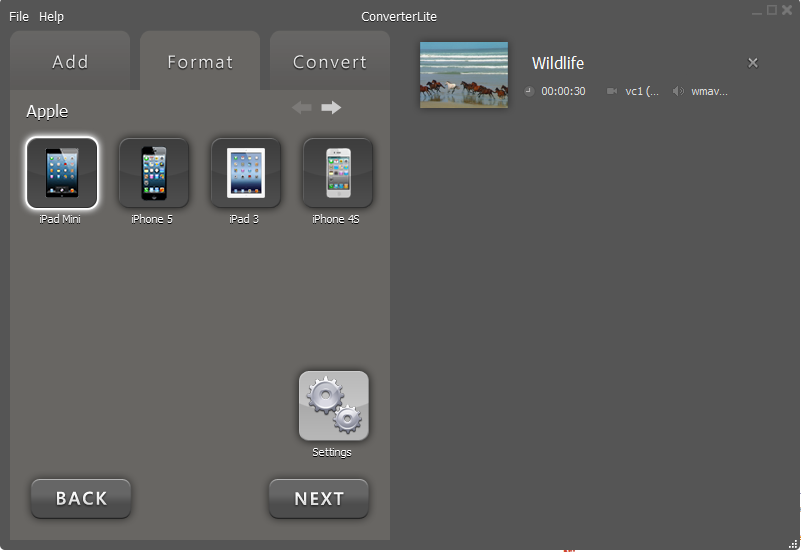
What’s new?
- Fix: Crash on initial application load
- New: Apple iPad Mini support
- New: Galaxy Note II support
- New: Kindle Fire/HD support
- New: M4A support
- New: M4V support


This entry was posted in ConverterLite. Bookmark the permalink.

Post navigation

← Convert MPEG to 3GP
Version 1.6.2 →

Recent Posts

  • What is .M4A?
  • What is .3GP?
  • How to Rip CD/DVD
  • How to Convert AVI to MPEG
  • How to Convert MOV to AVI

Recent Comments

  • MediaPlayerLite on How to remove Funmoods toolbar
  • Elora on How to remove Funmoods toolbar
  • cilantro on How to remove Funmoods toolbar
  • cuervo on How to remove Funmoods toolbar
  • MediaPlayerLite on How to remove Funmoods toolbar

Archives

  • March 2013
  • February 2013
  • January 2013
  • September 2012
  • July 2012
  • June 2012
  • May 2012
  • April 2012

Categories

  • Audio
  • CD
  • ConverterLite
  • DVD
  • Install/Uninstall
  • Learn
  • Uncategorized
  • Video
  • Blog
  • About
  • Support
  • Uninstall
  • EULA
  • Privacy
  • Contact
ConverterLite is distributing modified installers which differ from the originals. The modified installers are compliant with the original software manufacturer's policies and terms & conditions. InstallIQ™ is an install manager that will manage the installation of your selected software. In addition to managing the installation of your selected software, InstallIQ™ will make recommendations for additional free software that you may be interested in. Additional software may include toolbars, browser add-ons, game applications, anti-virus applications, and other types of applications. You are not required to install any additional software to receive your selected software. You can completely remove the program at any time in Windows' Add/Remove Programs.
Proudly powered by WordPress | Theme: Toolbox by Automattic.